Template for businesses

Governance Starter Kit for the Power Platform.

Product language: German. An English edition is planned.

Introduce rules, roles, and environments for Power Automate, Power Apps, and Copilot Studio yourself: 54 review questions for a current-state assessment, a fully drafted policy with 15 decision points, forms for requests, handover, and decommissioning, an Excel workbook with analysis and a rollout plan, and a handbook that explains every review question and every decision. This way, you bring order to your Power Platform without slowing down your makers.

You need a person with admin rights for the Power Platform and someone who is authorized to decide on rules in the company. Microsoft licenses and the implementation in the admin center are not included in the price.

  • 64-page handbook
  • 54 review questions
  • 15 decision points
  • €249 plus VAT
Governance-Starterpaket-Power-Platform_Arbeitsmappe.xlsx
Overall result61 %
Action required
Open actionsA 7B 9C 5
  • Tenant and roles78 %
  • Default environment52 %
  • Environments61 %
  • Data policies49 %
  • Sharing and access84 %
  • Lifecycle42 %
  • Security and logs70 %
  • AI and agents52 %
StartInventoryAnalysisAction planDecisionsRollout plan
Sample view of the workbook's Analysis sheet with sample data

01When the kit pays off

Governance does not mean prohibiting.

Governance defines who may build what where, which data flows where, and who takes care of a solution once it becomes important. The Starter Kit gives you a ready-made structure for this that you adapt to your company instead of starting with a blank page.

Growth in the default environment

Everyone with a license can build apps, flows, and agents there. Nobody knows exactly what exists, who owns it, and which data it uses. The inventory creates an overview.

Microsoft is changing the rules

Unmanaged developer environments are being blocked, Managed Environments enforce licenses, and Dataverse for Teams is being phased out. The kit shows what to do first.

Agents are being added

Copilot Studio lets people build agents that access company data. The kit governs who may create and share them and which knowledge sources and connectors are allowed.

Someone is asking about rules

Those responsible for information security, data protection, or internal audit want to know who is allowed to do what and how it is controlled. The policy, role matrix, and inventory provide written answers.

02What matters now

Three deadlines that won't wait.

Microsoft has announced changes to the Power Platform that affect existing environments and apps. The rollout plan in the kit therefore begins with these points, even before the policy.

  1. Review question B20 Unmanaged developer environments

    Microsoft suspends them from this date and begins deleting them on January 15, 2027. The solutions must be moved beforehand, or the environment must be converted to a managed environment.

  2. Review question B18 Managed Environments

    From then on, apps in Managed Environments open only for people with a suitable license, usually premium. Check beforehand who is affected.

  3. Review question B21 Dataverse for Teams

    Microsoft suspends environments that have not been upgraded to Dataverse from this date and decommissions them from October 30, 2027.

Sources on Microsoft Learn, checked on November 1, 2026: Important changes (deprecations) coming in Power Platform (opens in a new tab) and Licensing for Managed Environments (opens in a new tab). Microsoft may postpone dates; check the current status.

03The package

Four files, one complete framework.

You receive a ZIP package with all files, ready to use immediately and for your entire company. The templates have a neutral design so that you can adopt them with your own logo and your own terms.

DOCX

Governance policy (Word)

Fully drafted policy with 13 chapters and 15 decision points, plus explanations, processes, examples, and appendices, ready to adapt and adopt.

DOCX

Forms and reference sheet (Word)

Requests for a new environment and approval of a connector, handover and decommissioning of a solution, plus the "Rules for makers" reference sheet.

XLSX

Workbook (Excel)

Current-state assessment with automatic analysis, environment plan, connectors, risk assessment, inventory, role matrix, rollout plan, and naming convention.

Cover page of the handbookPDF

Handbook (PDF)

Procedure in five steps, status of the Microsoft tools, decision aids for all decision points, and all review questions with review steps and sources.

The most important sheets of the workbook

  1. InventoryAll 54 review questions with review steps, criterion, and action
  2. AnalysisResults for each area with a traffic light status indicator, a chart, deadlines, and a top 10 list
  3. Action planAll outstanding items, automatically sorted by priority
  4. DecisionsThe 15 decision points with suggested choices and their consequences
  5. Environment planEach environment with zone, owners, and notes
  6. ConnectorsClassification per zone for data policies and the allowlist
  7. Risk assessmentTen criteria determine the risk class and the obligations
  8. InventorySolutions with owners and next review
  9. RolesRoles and role matrix with a check for exactly one accountable role per task
  10. Rollout plan60 steps in five phases with location, role, and date

04How it works

In five steps to governance people put into practice.

The workbook guides you from the current-state assessment to ongoing operations. It automatically produces results, priorities, and guidance.

  1. Time-critical items first

    Three Microsoft deadlines will not wait for your policy. The rollout plan begins with the points that have a deadline.

  2. Assess the current state

    The 54 review questions show where you stand. Copy environment details and the inventory from the admin center into the workbook.

  3. Decide

    Define zones, decision points, connectors, roles, and risk classes. The workbook is prepopulated with suggestions, and the handbook explains the consequences of each option.

  4. Adopt

    Transfer decisions to the policy, replace placeholders, and have it adopted. Provide the forms and reference sheet where makers will find them.

  5. Configure and operate

    Apply settings in the order of the plan. After that, the workbook reminds you of reviews and overdue dates.

05The review questions

54 review questions in eight areas.

From the tenant through the default environment, environments, and data policies to sharing, lifecycle, security, and agents. Each review question is weighted and, where there is a gap, leads to an action with a priority. Here are all questions at a glance; review steps, criteria, actions, and sources are in the package.

01Tenant and rolesWho administers, who may create environments, tenant-wide switches8
  1. B01Do only a few named people hold the Power Platform Administrator role?
  2. B02Are admin roles activated only when needed and for a limited time, or reviewed regularly?
  3. B03May only admins create production and sandbox environments?
  4. B04Is it defined who may create trial environments?
  5. B05Is it defined who may create developer environments and how personal development areas are created?
  6. B06Are tenant-wide analytics turned on?
  7. B07Is tenant isolation deliberately configured, and are exceptions documented?
  8. B08Is it defined who may create agents in Copilot Studio?
02Default environmentPurpose, data policy, sharing, and cleanup of the environment everyone uses6
  1. B09Does the default environment have a meaningful name and a known purpose?
  2. B10Does a separate, strict data policy apply to the default environment?
  3. B11Is sharing in the default environment limited?
  4. B12Do new makers not end up in the default environment automatically?
  5. B13Are the resources in the default environment reviewed regularly, and are important solutions moved?
  6. B14Has it been decided in which environment SharePoint forms are created?
03EnvironmentsZones, owners, Managed Environments, groups, and deprecations8
  1. B15Is there a documented zone model for the environments?
  2. B16Does every environment other than the default environment have an owner and a deputy?
  3. B17Are production and sandbox environments restricted to a security group?
  4. B18Have Managed Environments been chosen deliberately and the licenses for them checked?
  5. B19Do environment groups with published rules represent the zones?
  6. B20Have unmanaged developer environments been recorded and decisions made about them?
  7. B21Have Dataverse for Teams environments been recorded, and is the conversion planned?
  8. B22Has the region of the environments been chosen deliberately and documented?
04Data policiesClassifying connectors, allowlist, custom connectors, and exceptions8
  1. B23Is there a tenant-wide baseline policy for connectors?
  2. B24Are new connectors automatically classified as "Non-business"?
  3. B25Are custom connectors governed via URL patterns?
  4. B26Have the HTTP connectors been classified deliberately?
  5. B27Are individual actions of sensitive connectors blocked where necessary?
  6. B28Has a decision been made on advanced connector policies?
  7. B29Are desktop flow actions governed in the data policies if desktop flows are used?
  8. B30Is there a defined process for exceptions to the data policies?
05Sharing and accessHow widely apps, flows, and agents are shared, who has which permissions, and who accesses them from outside the organization6
  1. B31Are sharing limits for canvas apps set per zone?
  2. B32Is sharing of solution-aware flows governed per zone?
  3. B33Is the sharing of agents for editing and use governed per zone?
  4. B34Is it defined whether agents may be published without authentication?
  5. B35Is access from outside (guests, other tenants) governed?
  6. B36Have the actual access permissions for data and solutions been reviewed to ensure they do not exceed the minimum required?
06LifecycleInventory, owners, review, handover, and decommissioning7
  1. B37Is the inventory in the admin center analyzed regularly?
  2. B38Does every production solution have an owner and a deputy?
  3. B39Are apps, flows, agents, and connections handed over when employees leave or change roles?
  4. B40Are solutions reviewed regularly according to their risk class?
  5. B41Is the decommissioning of solutions governed?
  6. B42Does only what is packaged in solutions go into production?
  7. B43Is each environment's latest activity monitored, and is the automatic cleanup process known?
07Security and logsLogs, monitoring, recommendations, licenses, data protection, backup, and restore6
  1. B44Are activity logs set up in Microsoft Purview, and does someone analyze them?
  2. B45Is auditing turned on in production environments with Dataverse?
  3. B46Are the recommendations in the admin center (Actions) addressed regularly?
  4. B47Are license and capacity reports checked regularly?
  5. B48Have data protection and employee co-determination requirements for usage data and logs been clarified?
  6. B49Have backup and restoration of business-critical solutions been demonstrated?
08AI and agentsGenerative AI, data movement, knowledge sources, and agents in operation5
  1. B50Has a decision been made on data movement across regions for AI features?
  2. B51Have the allowed knowledge sources for agents been defined per zone?
  3. B52Has a decision been made on models from other providers and on preview and experimental AI models?
  4. B53Are agents listed in the inventory with owners?
  5. B54Is it defined who may view agents' conversation transcripts?

06The policy

A policy that fits you.

The policy assigns each solution to one of four zones. You decide for yourself at 15 points. A proposal is available for each decision point, and the handbook explains the options and their consequences.

Zone 1: Personal

Low-risk personal productivity in the default environment, development and testing in personal developer environments. Sharing is permitted only within the limits of W06 and W07.

Zone 2: Team

Solutions for a team or an area with manageable risk (risk class low or medium).

Zone 3: Business-critical

Business-critical and cross-departmental solutions (risk class high).

Special environments

Special purposes, for example SharePoint forms, a pilot for new AI features, and an environment for child flows.

WEnvironments and dataDecision points with the kit's suggested choices7
  1. W01Who creates production and sandbox environments?Proposal: only Power Platform administrators, on request
  2. W02How are personal development areas created?Proposal: environment routing for all makers
  3. W03Where do Managed Environments apply (personal developer environments are always managed)?Proposal: in zones 2 and 3
  4. W04Which connectors are allowed as business connectors in the default environment?Proposal: the Microsoft connectors that cannot be blocked, plus Microsoft Forms and Word Online (Business); all others blocked
  5. W05How are connectors controlled?Proposal: classic data policies everywhere, plus the allowlist (advanced connector policies) in zone 3
  6. W14Where are custom connectors allowed?Proposal: only on request, only in zones 2 and 3
  7. W15How is tenant isolation configured?Proposal: turned on, exceptions only on request
WSharing, agents, and lifecycleDecision points with the kit's suggested choices8
  1. W06How widely may canvas apps be shared in zone 1?Proposal: without security groups, at most 5 people
  2. W07May solution-aware flows be shared in zone 1?Proposal: no
  3. W08Where may agents be shared with security groups?Proposal: in zones 2 and 3
  4. W09Who may create agents in Copilot Studio?Proposal: only named authors: a security group for authors, plus managed licenses and permissions in the environments
  5. W10May data for AI features leave the region?Proposal: only after review per zone or environment
  6. W11How often are solutions reviewed per risk class (low, medium, and high)?Proposal: every 12, 6, and 3 months
  7. W12When is an unused solution reviewed for decommissioning?Proposal: after 90 days without use
  8. W13When do production flows run under a service account?Proposal: mandatory in zone 3, recommended in zone 2

07A look inside

This is how each review question is structured.

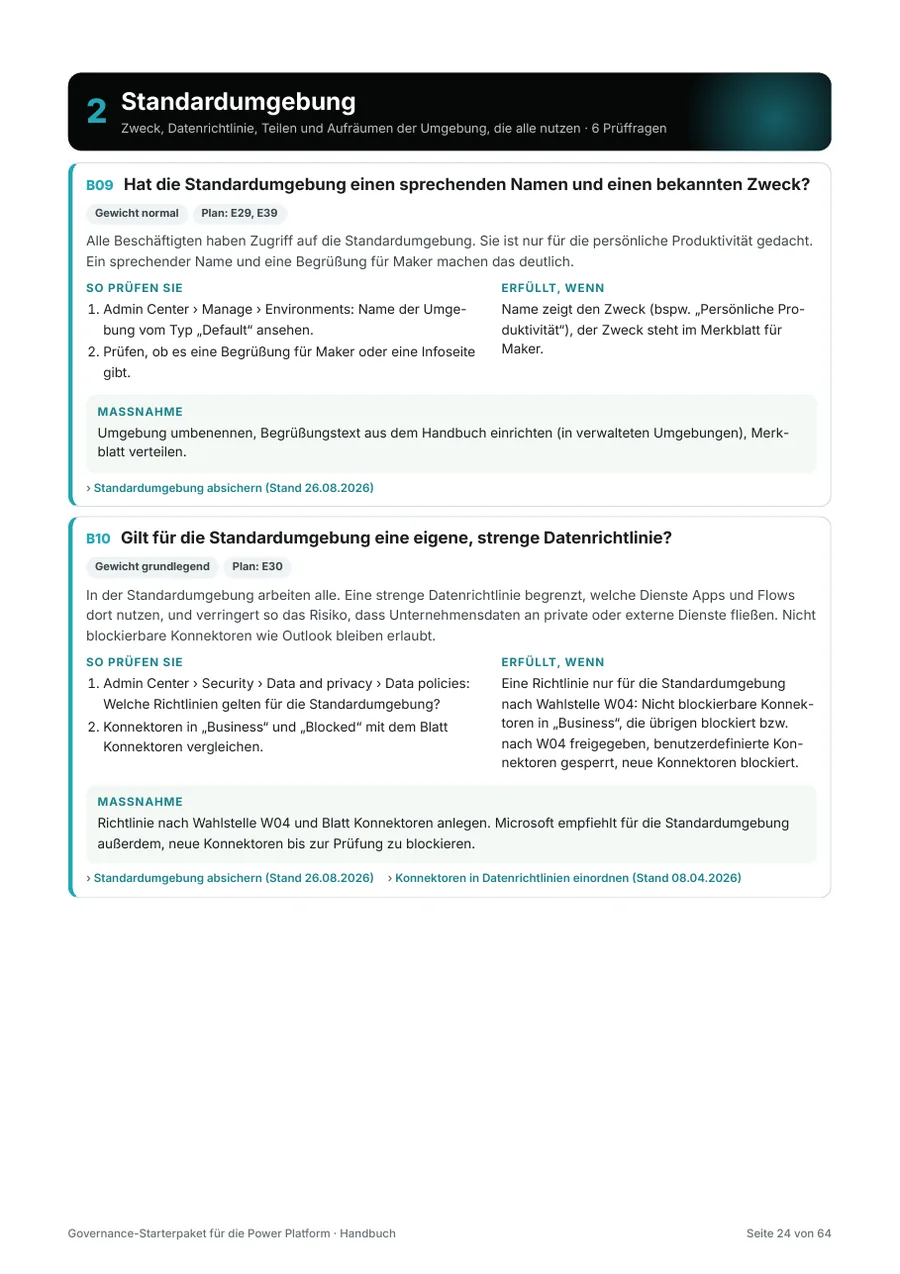
Background, review steps with the path in the Power Platform admin center, a clear criterion, a specific action, and the Microsoft sources. Here is one complete review question as it appears in the handbook.

B10

Does a separate, strict data policy apply to the default environment?

Weight: fundamentalDefault environment

Everyone works in the default environment. A strict data policy limits which services apps and flows can use there and thus reduces the risk of company data flowing to private or external services. Connectors that cannot be blocked, such as Outlook, remain allowed.

How to check

  1. Admin center › Security › Data and privacy › Data policies: Which policies apply to the default environment?
  2. Compare the connectors in "Business" and "Blocked" with the Connectors sheet.

Met if

A policy only for the default environment according to decision point W04: connectors that cannot be blocked in "Business," the others blocked or allowed according to W04, custom connectors blocked, new connectors blocked.

Action

Create the policy according to decision point W04 and the Connectors sheet. For the default environment, Microsoft also recommends blocking new connectors until they have been reviewed.

Sources: Secure the default environment (opens in a new tab), Connector classification in data policies (opens in a new tab)
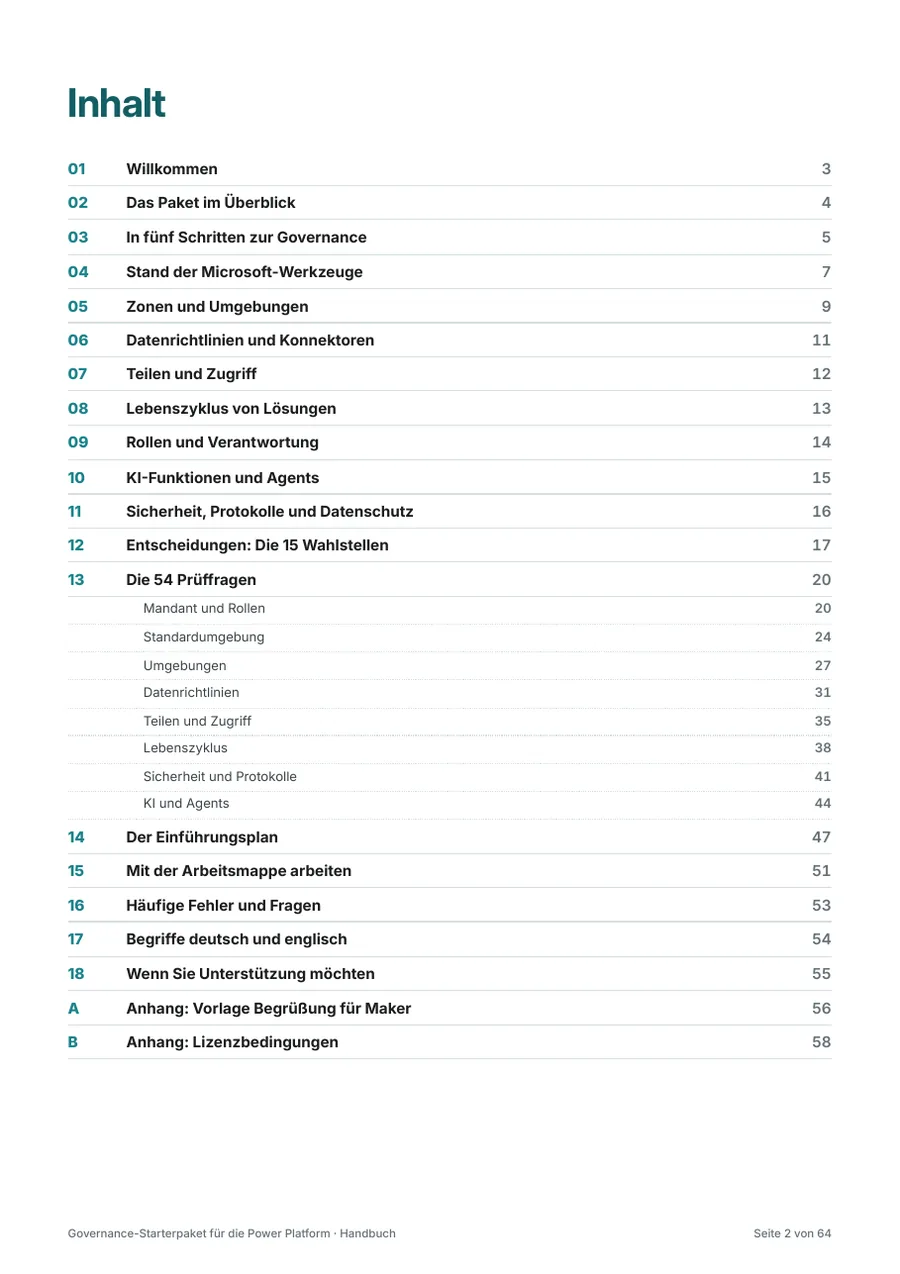
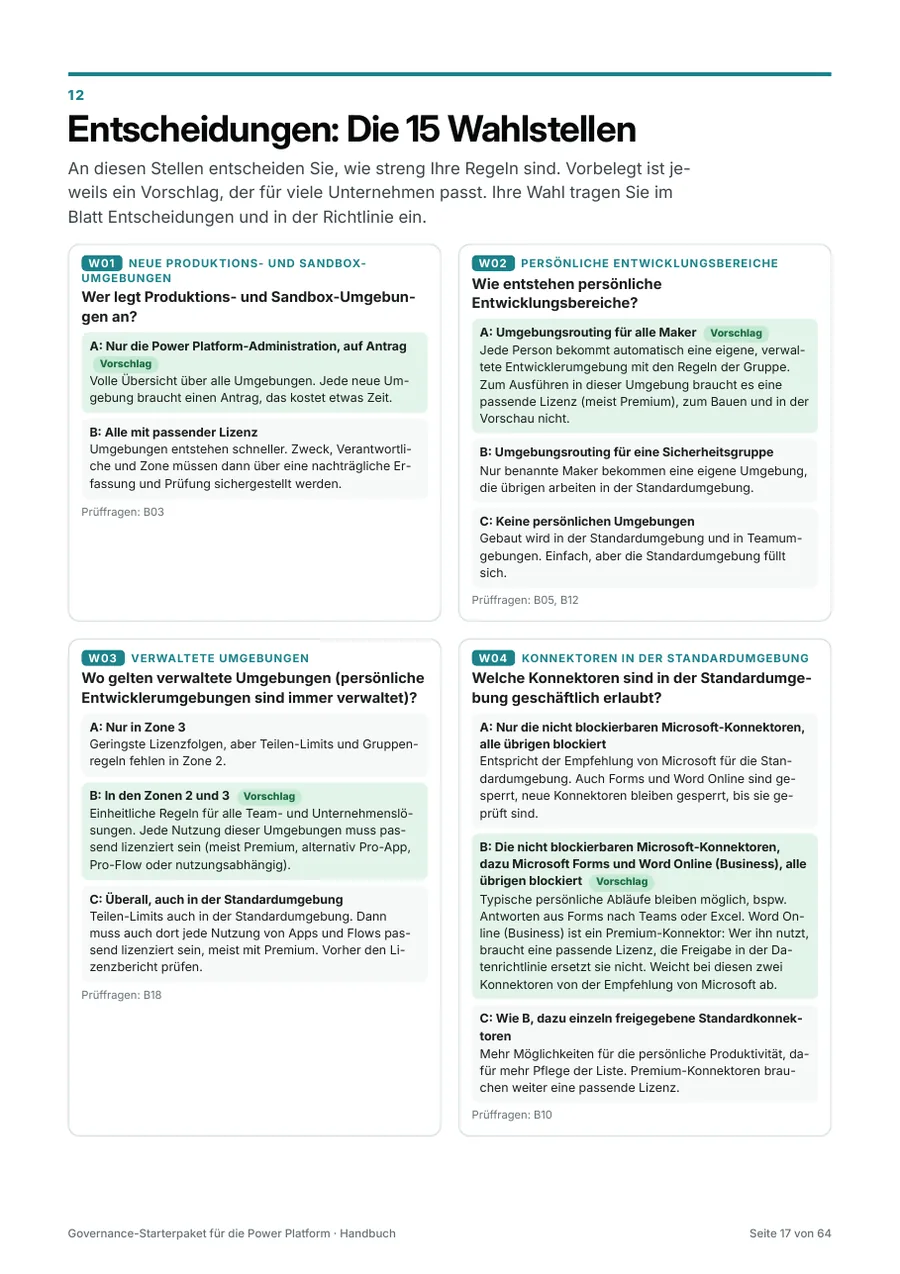
Table of contents of the handbook"Decisions" page from the handbookPage with review questions from the handbook

Check before you buy whether the approach and depth fit your organization. The sample includes the table of contents, the introduction, the five-step approach, and the zone model for your environments, on original pages from the handbook (in German).

Open sample (PDF, German) (opens in a new tab) 172 KB

08Price and license

Buy once, use across the whole company.

One license applies to your company and all employees.

The license terms apply. System requirements: Microsoft Excel and Word 2016 or later or Microsoft 365 (Windows or macOS) or Excel for the web, and a program for PDF files. For the settings, you need access to the Power Platform admin center with a suitable role.

Purchase via Digistore24

I will sell my products through Digistore24, a sales platform for digital products. Sales will start shortly; until then, you can ask to be notified by email.

  • Seller and contractual partner: Digistore24 GmbH in Hildesheim, Germany. It sells in its own name.
  • Payment and invoice: Via Digistore24; the invoice is sent by email.
  • Download: After payment, you receive the link to the ZIP package. It is valid for 30 days and allows up to 10 downloads.
  • Content and license: The product materials are created by me, and my license terms apply. For questions about payment and invoices, Digistore24 will help; for questions about the content, I will.

09License terms

Clear rules for use.

The same terms apply to all my products: powerbunch GmbH's license terms for digital products. With the purchase, your company receives the company license. Here you can see the key points at a glance, followed by all sections in detail.

As of November 1, 2026 · Version 1.0. On request, the consultant license is available for use with clients, and the group license for affiliated companies. This offer is directed exclusively at businesses.

10Prefer guidance?

I roll out governance together with you.

Would you prefer not to handle the rollout alone, or would you like a second opinion on your decisions? I support your team from the current-state assessment to ongoing operations, using exactly the templates from this kit if you wish.

11Questions and answers

Frequently asked questions

What distinguishes the kit from the free guide?
The guide "Power Platform Adoption" describes how to roll out the Power Platform in your company in three phases. The Governance Starter Kit turns this into the rules for your environments: review questions for a current-state assessment, a policy to adopt, forms for everyday use, and a rollout plan with all settings.
Do I need the CoE Starter Kit?
No. Microsoft no longer actively maintains the CoE Starter Kit; important features such as inventory and recommendations are now part of the Power Platform admin center. The Governance Starter Kit builds on those capabilities. You can continue to use an existing CoE Starter Kit installation, but it will no longer receive updates for new features.
Does the kit also apply to Copilot Studio?
Yes, for agents in Copilot Studio: who may create and share them, which knowledge sources and connectors they use, and how data flows for AI features. Microsoft 365 Copilot outside the Power Platform is not part of the kit.
Which permissions do I need for the settings?
You configure most settings in the Power Platform admin center with the Microsoft Entra role "Power Platform Administrator." This role alone does not allow you to manage licenses and security groups; that requires additional Microsoft Entra roles or help from whoever administers Microsoft 365 in your organization. There are separate roles for logs in Microsoft Purview. For each review question, the handbook specifies where to find the setting in the admin center.
What about data protection and the works council?
Inventory, analytics, and logs also show who built and used what. The policy contains notes and placeholders on this but does not replace legal advice. Coordinate the adapted policy with those responsible for data protection in your organization and, where applicable, the works council before adopting it.
Are solutions and pipelines included?
The policy specifies when solutions and the separation of development, test, and production become mandatory. The kit does not describe in detail how to set up solutions, pipelines, and deployments.
Which programs do I need?
Microsoft Excel and Word 2016 or later or Microsoft 365 on Windows or macOS, or Excel for the web, plus a program for PDF files. The workbook sheets are protected without a password so that formulas are not accidentally overwritten.
May service providers use the kit with clients?
Service providers may use the kit on behalf of the purchasing company for its own governance. Anyone who wants to use it as a consulting firm with clients needs a consultant license. It is available on request; just contact me.
May I pass on the adopted policy?
Yes. The adopted policy, forms adapted to your processes, and the completed workbook are your work products. You may publish them within the company and provide them to third parties for your own purposes, for example internal audit, external auditors, or IT service providers. You may not distribute or sell the templates themselves as templates.
How do I receive the files and an invoice?
You buy through my sales partner Digistore24 (Digistore24 GmbH, Hildesheim, Germany). Digistore24 is your contractual partner for the purchase, receives the payment, and sends you the invoice by email. The VAT treatment depends on your company's registered office and the details provided during checkout. Immediately after payment, you receive the link to download the ZIP package. It is valid for 30 days and allows up to 10 downloads, so please save the files right after your purchase. For questions about payment and invoices, Digistore24 support will help; for questions about the content, I will.
How up to date is the content?
All information has been checked against Microsoft's documentation (as of November 2026), with source and date for each review question. Microsoft continuously develops Power Platform administration. In the chapter "Status of the Microsoft tools," the handbook shows what is currently changing and how the kit deals with it. The version and date are shown on the cover page.

Questions about the Governance Starter Kit? Contact me.

Whether you need a license for your consulting firm, have questions about a decision point, or would like support during the rollout, we clarify what you need in a free, no-obligation initial consultation via Microsoft Teams.