Your first approval process
You want to approve vacation requests, orders, or invoices digitally. The planner guides you through all decisions before the first flow is created.
Template for businesses
Product language: German. An English edition is planned.
Plan, build, and test approval processes that stand up to everyday use: with deadlines, reminders, escalation, delegation, logging, and clearly defined licensing requirements. Ten building blocks presented as detailed step-by-step guides, four scenarios from vacation requests to contract approval, an Excel planner, and a template for process description and acceptance.
You receive step-by-step guides and planning documents and build the flows yourself. Basic knowledge of cloud flows, dynamic content, and SharePoint lists is required.
01When the toolkit pays off
Requests sit untouched during vacations, nobody receives reminders, decisions cannot be substantiated later, and the flow depends on one person's account. The toolkit gives your team a proven method to get this right from the start.
You want to approve vacation requests, orders, or invoices digitally. The planner guides you through all decisions before the first flow is created.
Requests sit untouched, expire after weeks, or fail because of absences. The building blocks for deadlines, escalation, and delegation solve exactly that.
Internal auditors, external auditors, or internal control teams want to know who made the decision and when. The log keeps a traceable record of every decision beyond the 30-day run history retention period.
Every business unit builds approvals differently. With the toolkit, all processes follow the same data model, the same building blocks, and the same test cases.
02The package
You receive a ZIP package with all files, ready to use immediately and for any number of your own approval processes.
Document the process, define stages and deadlines, choose suitable building blocks, check licenses, plan the data model and permissions, and log all test cases.
Structured template that describes the finished approval process: roles, flow, rules, data, permissions, technology, operations, test result, and acceptance.
 PDF
Step-by-step procedure, approval fundamentals, ten building blocks presented as detailed step-by-step guides, and four scenarios from vacation request to contract approval.
The sheets of the planner
03How it works
Plan first, then build, then test. The planner records every decision, and the handbook guides you step by step through the build.
Fill in the fact sheet: who submits requests, who decides, how many requests come in, and which rules apply.
For each stage, define the condition, approvers, type of approval, deadline, reminder, escalation, and delegation.
Answer twelve questions. The planner shows which building blocks you need and in which chapter they are described.
Check connectors, plan lists and columns, and define permissions for each role.
Build the chosen building blocks using the step-by-step guides in the handbook, first in a test or development environment.
Run all relevant test cases, record the results, and have the process formally accepted using the process description.
04The building blocks
Each building block is a detailed step-by-step guide with action names in German and English, expressions to copy, pitfalls, and test cases. You build only what your process needs. All of them work with the standard connectors of the Microsoft 365 license, except in Managed Environments. Four scenarios show how the building blocks fit together into typical approval processes.
Four scenarios from vacation request to contract approval
Employees request vacation, and their manager decides. If the manager is absent, the delegate decides.
Orders are approved in up to three stages depending on the amount: cost center, purchasing, and management for amounts at or above a high threshold.
Incoming invoices are checked for factual and financial accuracy before payment. At or above a specified amount, management also decides.
The business unit and the legal department review a document at the same time. For a high ContractValue or a long term, management then decides.
05A look inside
Goal, use, prerequisites, numbered steps with the actions, expressions, pitfalls, and test cases. Here is the overview of one building block and pages from the handbook.
8 steps8 test casesStandard connectors only
Each stage gets a deadline. Before it expires, a separate flow reminds the approvers; after the deadline, the request also goes to an escalation contact. If nobody responds there either, the request is considered expired.
When decisions have to be made within a certain time, for example because of an early payment discount. When requests get lost in everyday work and reminders are needed. When another decision-maker should step in if no action is taken.
Filter query · Due Reminders
Status eq 'In Review' and RemindFrom le '@{utcNow()}'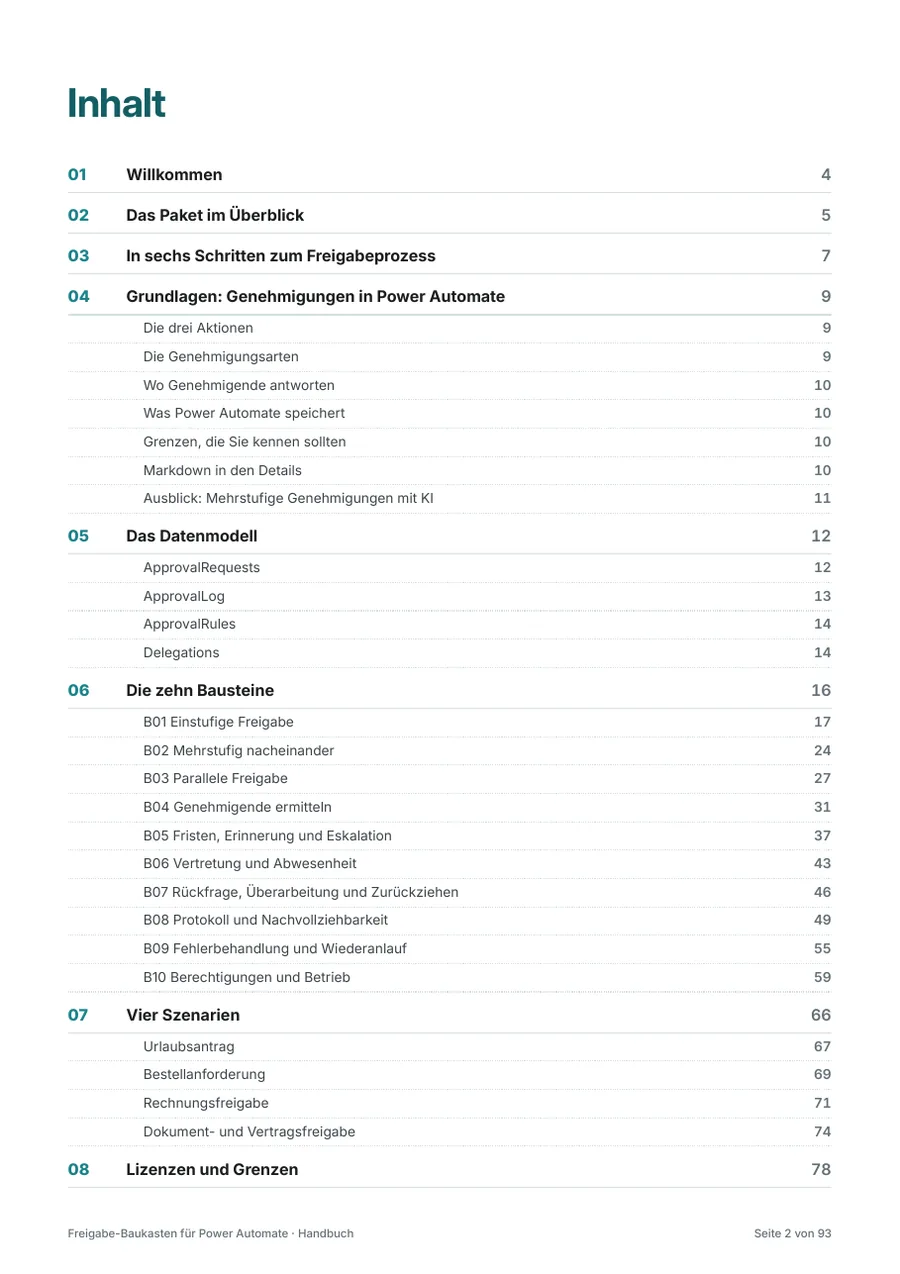
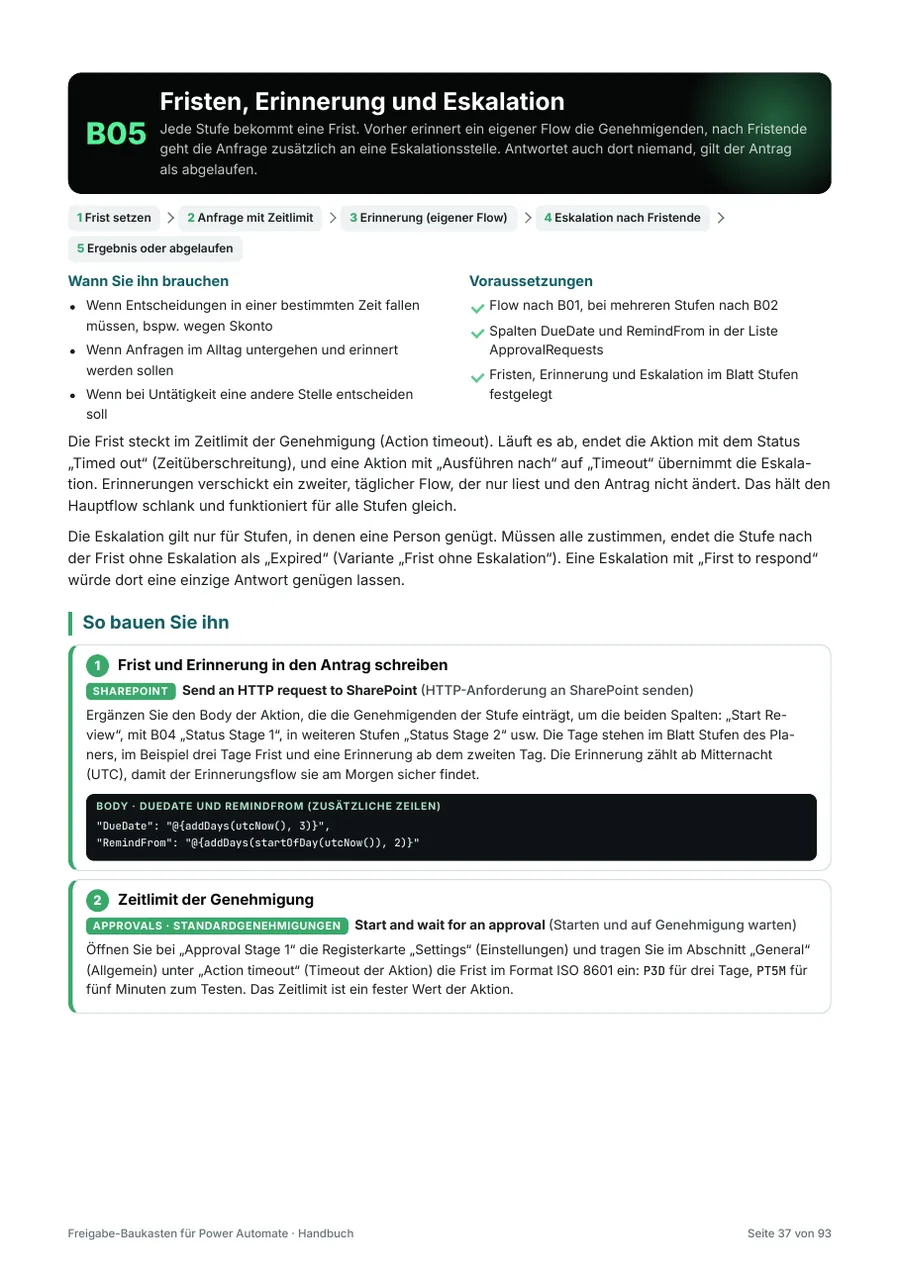
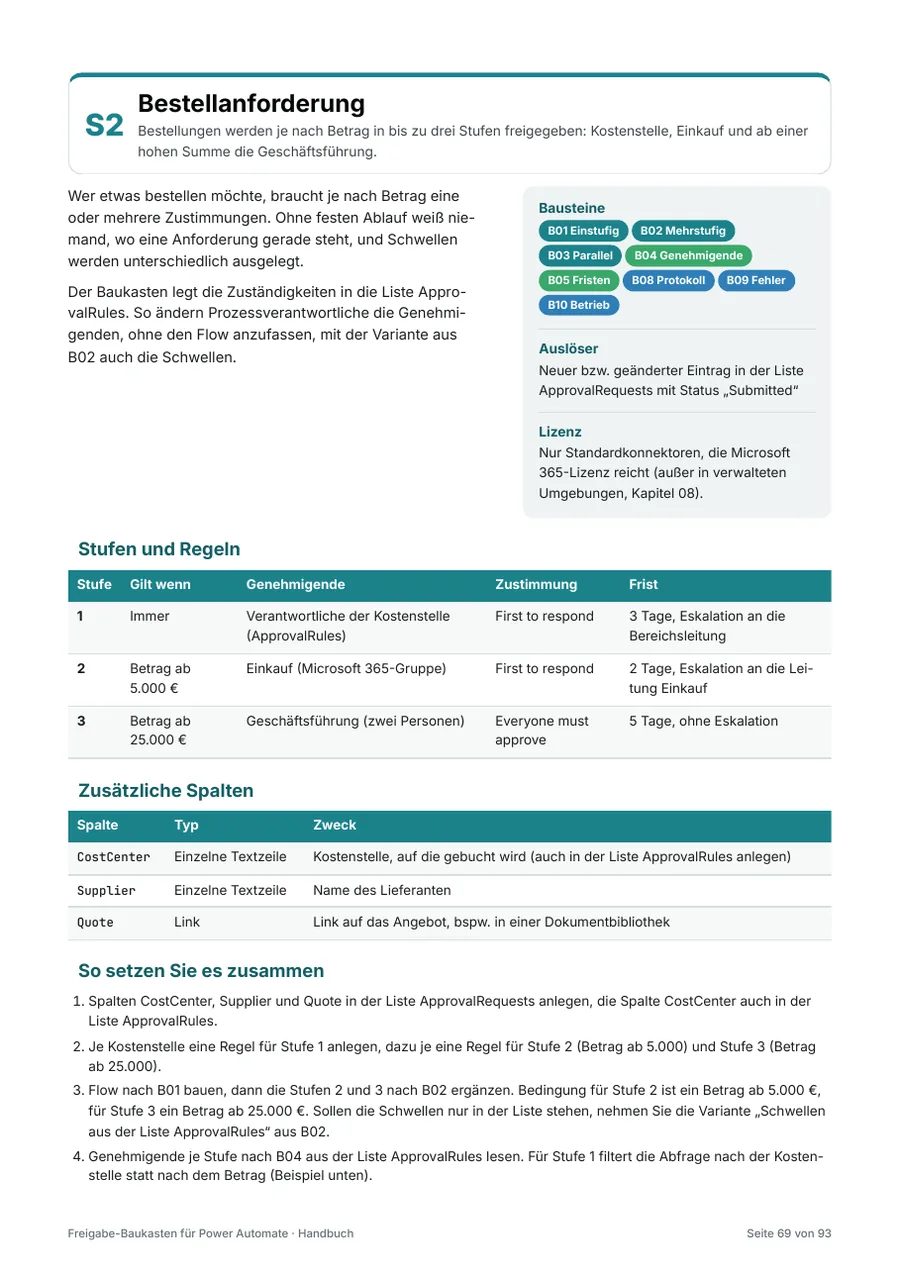
Check before you buy whether the structure and approach fit your team. The sample includes the table of contents, the first two chapters, the overview of all ten building blocks with the beginning of building block B01, and the purchase requisition scenario, on original pages from the handbook (in German).
Open sample (PDF, German) (opens in a new tab) 339 KB06Price and license
One license applies to your company, all employees, and any number of your own approval processes.
The license terms apply.
System requirements. For the planner: Microsoft Excel 2016 or later or Microsoft 365 on Windows or macOS, alternatively Excel for the web. For the process description: Microsoft Word 2016 or later or Microsoft 365. For the handbook: a program for PDF files. For building the flows: Power Automate with standard connectors, for example via a Microsoft 365 license, and a SharePoint site. In Managed Environments, premium licenses are required (handbook, chapter 08).
Purchase via Digistore24
I will sell my products through Digistore24, a sales platform for digital products. Sales will start shortly; until then, you can ask to be notified by email.
07License terms
The same terms apply to all my products: powerbunch GmbH's license terms for digital products. With the purchase, your company receives the company license. Here you can see the key points at a glance, followed by all sections in detail.
Your license
For all employees and other persons acting on behalf of the purchasing company.
As of November 1, 2026 · Version 1.0. On request, the consultant license is available for use with clients, and the group license for affiliated companies. This offer is directed exclusively at businesses.
08Prefer to have it implemented?
Would you prefer not to build the process yourself? Does it need integrations with ERP, accounting, or signature services, or would you like a second opinion on your design? I implement the approval process for you, from concept to handover to your team.
Purchase price credited: If you commission the implementation of an approval process after purchase, I deduct the toolkit's purchase price from my quote.
09Questions and answers
10Further reading
Whether you need a license for your consulting firm, have questions about a building block, or want your approval process implemented, we clarify what you need in a free, no-obligation initial consultation via Microsoft Teams.